March 4, 2026
Modern Cybersecurity Compliance Beyond SOC 2 and ISO
Modern Cybersecurity Compliance Beyond SOC 2 and ISO

Omair


Omair Manzoor is the Founder, CEO, and Chief Hacker of ioSENTRIX, a CREST-accredited cybersecurity firm. With 14+ years in offensive security, he has led penetration tests for Fortune 500 companies including engagements for Amazon, Bank of America, VISA, and the London Underground. His exploits are part of the Metasploit Framework and Immunity Canvas. Omair is a published researcher, conference keynote speaker (DOD, CISA, BSides), and technical reviewer for academic security textbooks.
You read the advisory on Monday. You log in, click Update Now, watch the progress bar, and see "WordPress updated successfully." The ticket closes.
That progress bar was the exposure. CVE-2026-119977 is a flaw in how WordPress stages a core update, and the extraction step is performed by the version you are updating from. The hardening that closes the window ships inside the package being unpacked, so part of it is not in force while it is being unpacked. The disclosing researcher's technical write-up puts it plainly: clicking Update Now on an unpatched site "leaves one last race window open."
That is not a reason to delay the update. It is a reason to shut the window first, which takes one line of web server configuration.
CVE-2026-119977 is a race condition in WordPress core's update process, fixed in WordPress 7.1.4 on 28 October 2026. CISA added it to the Known Exploited Vulnerabilities catalog on 3 November 2026, with a remediation due date of 6 November.
The KEV entry describes a flaw that "could allow unauthenticated attackers to execute code on the server during the upgrade window," arising from "predictable, web-accessible staging paths used during full-package core upgrades."
Three details from that entry are worth copying into your own tracking rather than taking from coverage. Its knownRansomwareCampaignUse field reads Unknown, not Yes. Its forensicTriage field reads Yes, and its required action points at CISA's forensics triage requirements as well as remediation. And it cites BOD 26-04, "Prioritizing Security Updates Based on Risk" — not BOD 22-01, which many KEV write-ups still name out of habit. If your remediation SLA is written against a directive, write it against the right one.
The project's advisory lists every branch from 4.7.0 through 7.1.3 as affected, and ships a patched release for each: 7.1.4, 7.0.8, 6.9.11, 6.8.12, 6.7.11, 6.6.11, 6.5.14, 6.4.14, 6.3.14, 6.2.15, 6.1.16, 6.0.18, and on down to 4.7.39.
That 4.7 floor is a support boundary, not the date the behaviour started. The researcher's write-up traces the underlying updater behaviour back to 2.7.0, and says WordPress 2.7 through 4.6 "did not receive a fix and should be upgraded to a supported version." If you are running something that old, the advisory's range understates your position rather than describing it.
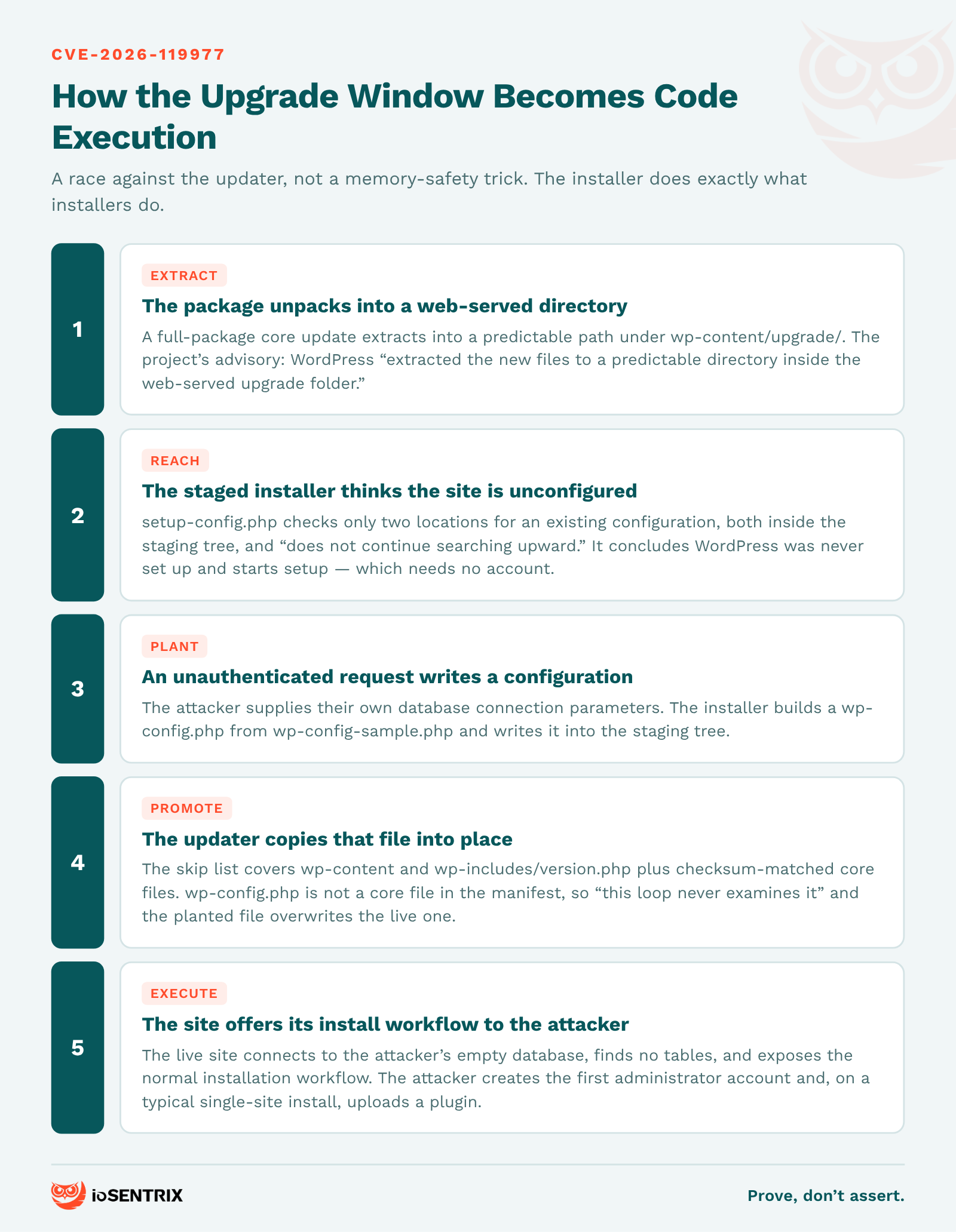
During a core update that uses a complete package, WordPress extracts the new files into a predictable directory inside wp-content/upgrade/, which the web server serves. The advisory's own words: WordPress "extracted the new files to a predictable directory inside the web-served upgrade folder. An unauthenticated attacker who wins a race against that extraction could reach remote code execution."
The researcher's write-up fills in the chain, and it is worth following to the end, because the interesting part is past the bit most summaries stop at.
The extracted package contains setup-config.php, the installer. That installer checks only two locations for an existing configuration — both inside the staging tree — and, in the write-up's words, "does not continue searching upward until it reaches /var/www/html/wp-config.php." So it concludes the site has never been configured and starts the normal setup process. That process requires no authentication.
An attacker reaching it can supply their own database connection parameters, and the installer writes a wp-config.php into the staging tree. The updater then copies that tree over the live installation. Its skip list is wp-content and wp-includes/version.php, plus any core file the checksum manifest shows is already up to date — and wp-config.php is not a core file in that manifest, so, as the write-up puts it, "this loop never examines it." The attacker's configuration lands as the site's real one.
Then the actual code execution: the live site connects to the attacker's empty database, finds no tables, and "exposes the normal installation workflow." The attacker creates the first administrator account, and on a typical single-site install, uploads a plugin.
So this is not a memory-safety trick. It is the installer doing exactly what installers do, in a directory that should not have been reachable, at a moment when the updater will faithfully promote whatever it finds there.
A staging path is the temporary directory an updater unpacks into before moving files into place. It is a security boundary whenever it sits inside the web root, because anything reachable there is reachable by anyone.
Because a core update runs code from two different WordPress versions, and the fix is split across both.
WordPress 7.1.4 makes three changes: it adds a 16-character random suffix to the staging directory name, it stops the pre-extraction cleanup from deleting upgrade/index.php (which prevented directory listing from leaking the name), and it adds wp-config.php to the skip list in update_core().
The extraction is performed by unpack_package(), which belongs to the updater already installed on the site. Only afterwards does WordPress load update-core.php from the new package. So on that first update:
wp-config.php skip already works. It lives in the new code, which is loaded from the package being installed. An attacker can no longer replace the live configuration or point the site at their own database.index.php do not. They live in the old code that performs the extraction.
What survives, in the write-up's words, is that "the temporary installer is therefore still reachable at a predictable path." An attacker can still set up the temporary WordPress copy with their own database, log in to it, "and execute PHP code with the web server's privileges before the staging directory is cleaned up. From there, they can still read or write files in the live WordPress directory."
That is a smaller window than the full chain above — the live configuration is safe — and it is still arbitrary code execution as the web server user. Only after 7.1.4 is installed do later updates get a random staging directory.
The practical consequence is narrow and worth acting on: close off wp-content/upgrade/ before you update, not after. A patch that must be applied through the vulnerable path is a pattern worth recognising generally — it shows up in updaters, bootstrappers and installers across the stack, and an application security programme built around dependency versions will not surface it, because nothing in the dependency graph is wrong. It belongs with the other secure SDLC practices that concern how code arrives on a server rather than what the code contains.
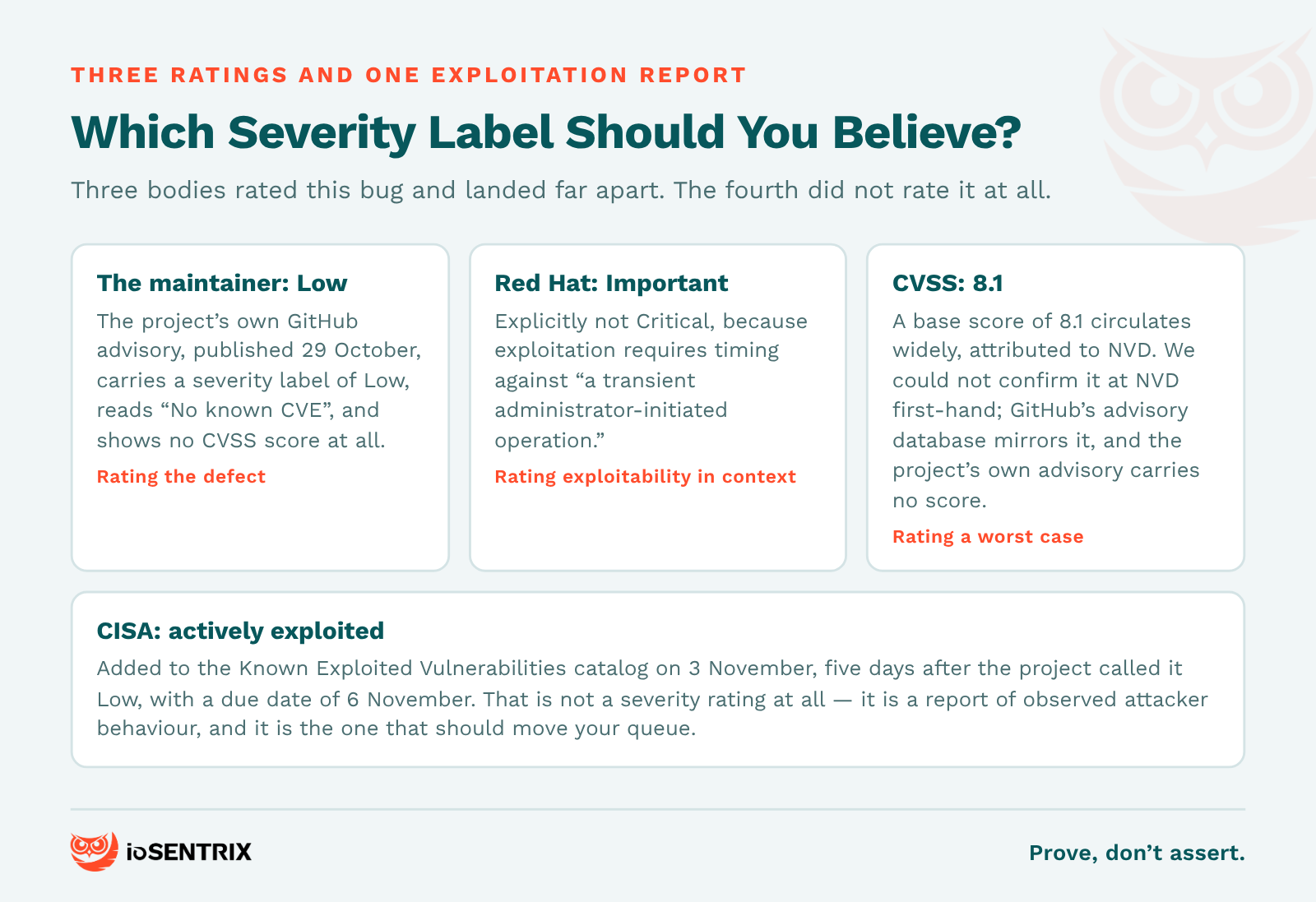
None of them on its own, and the spread is instructive rather than embarrassing. Three bodies rated this bug and arrived at very different places, and a fourth did something else entirely.
The project's own advisory, published 29 October, carries a severity label of Low and reads "No known CVE," with no CVSS score at all. Red Hat rates it Important, explaining that it is not Critical because exploitation requires timing against "a transient administrator-initiated operation." A CVSS base score of 8.1 circulates widely, attributed to NVD; we could not reach NVD to confirm it first-hand, though GitHub's own advisory database entry for the CVE does mirror that score. And CISA, five days after the project called it Low, listed it as actively exploited.
These are not contradictions so much as different questions. The maintainer is rating the defect. Red Hat is rating exploitability in context. CVSS is rating a worst case. CISA is not rating anything — it is reporting observed attacker behaviour, which is why it is the one that should move your queue.
A triage process that reads one number and routes accordingly will get this wrong in whichever direction its chosen source leans. The practical answer is to triage on mechanism and precondition, which is a question with an answer: is wp-content/upgrade/ reachable from the internet, and when does this site next run a full-package update?
The window is narrow, and saying so is not minimising it — it is what tells you which sites to look at first. From the researcher's write-up:
The update must use a complete package. Full, no-content and new-bundled packages contain the installer files the chain depends on. A partial or rollback update is only in scope if its archive happens to contain them.
wp-content/upgrade/ must be web-accessible. If that directory is not reachable over HTTP, the staged installer is not reachable either — which is also the mitigation.
The staging path must be predictable. This is version-dependent and it is the detail most worth checking. Versions 2.7.0–2.7.1, 2.8.0–4.3.35 and 5.9.0–7.1.3 use a predictable path. Versions 4.4.0–5.8.18 append a random suffix, so they are exploitable only if that path leaks some other way. A site on 6.x is in the predictable group; a site on 5.5 is not.
An update has to be running. This is not a flaw sitting open on an idle site. It is reachable during administrator-initiated or scheduled core updates — and wp core update in WP-CLI is not a safer route, because it uses the same core updater and extracts into the same directory.
That last point cuts both ways. A site that updates rarely has a small window. A fleet with automatic background updates across hundreds of installs has a window opening somewhere most days.
The project's fix is the remediation. These two approaches, both from the researcher's write-up, cover the update that installs it.
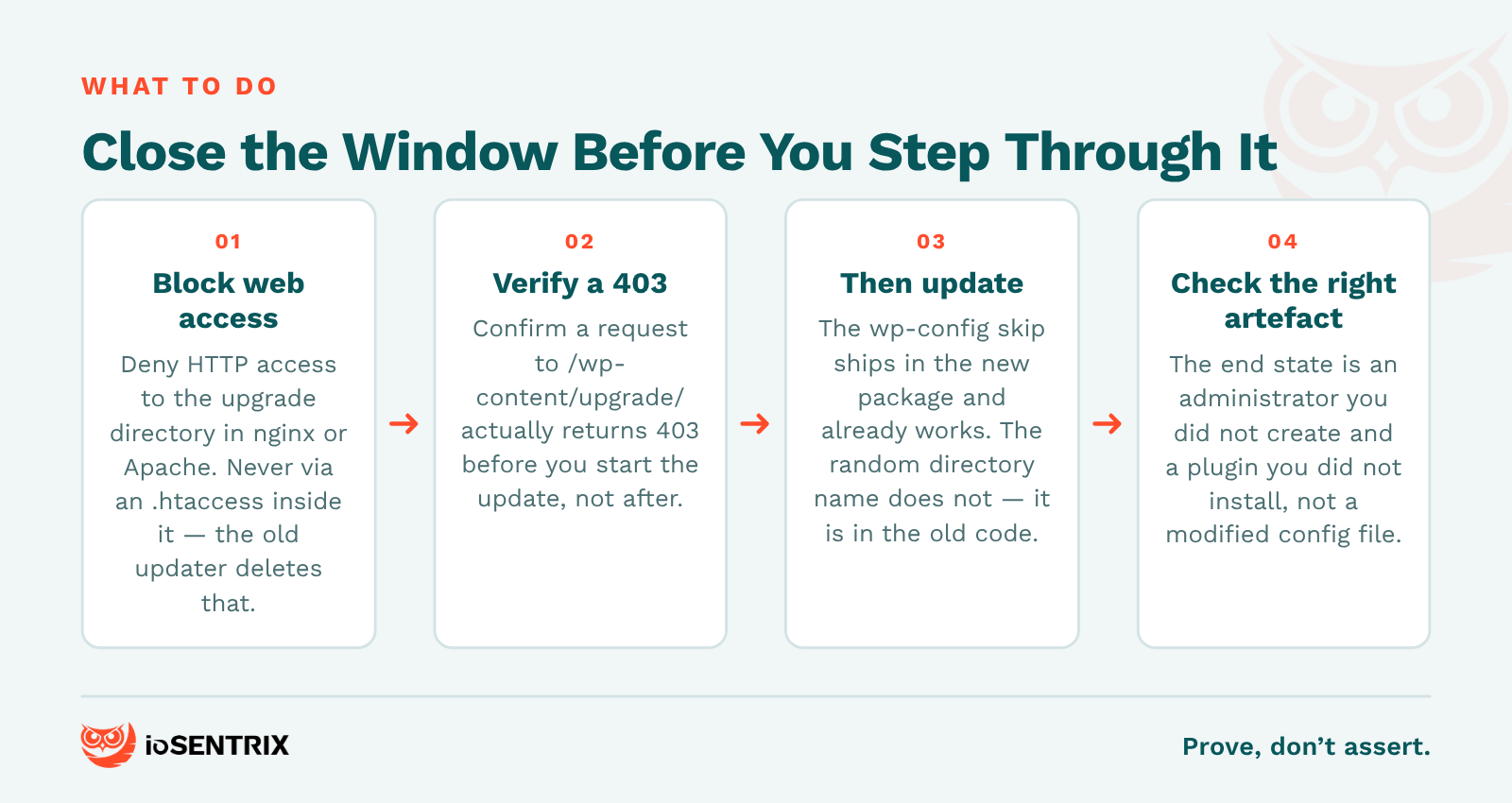
Block web access to wp-content/upgrade/. WordPress reads and writes that directory through the filesystem and never needs it served over HTTP. On nginx, a location ^~ /wp-content/upgrade/ block with deny all. On Apache, a <Directory> block with Require all denied in the virtual host configuration. If all you have is .htaccess, a RedirectMatch 403 ^/wp-content/upgrade/ line in the .htaccess in the WordPress root, above the rewrite block.
One trap, and it is the one that would bite in exactly the scenario this post is about: do not put an .htaccess file inside wp-content/upgrade/ itself. The unpatched unpack_package() deletes everything in that directory before extraction, so your control is removed moments before it is needed. Confirm a request to /wp-content/upgrade/ returns 403 before you start the update. This is the same class of control as the rest of your network and infrastructure hardening, and it is worth keeping permanently.
Or update manually, outside the web root. Download and extract the release somewhere not served, then copy wp-admin and wp-includes into place and sync the root while excluding wp-content, wp-admin and wp-includes. The release package contains no wp-config.php, so the live configuration is untouched. Afterwards, visit /wp-admin/upgrade.php or run wp core update-db to finish any database updates, and check that the copied files kept the right ownership for your web server user.
Inventory which sites sit in the predictable-path version groups, and do those first.
More than you can with most race conditions, as long as you look for the right artefact.
If the full chain completed, the end state is not a modified wp-config.php — that is the midpoint, and a successful attacker leaves a working one behind. The end state is an administrator account you did not create and a plugin you did not install. Check the user list for unexpected administrators, check plugin install and modification times against your change record, and look for any sign the site entered its installation workflow.
Check wp-config.php too, against known-good or version control, with its modification time read against the update. But know what that check means: in the case this post emphasises — a first update onto a patched branch — the configuration is the one thing the fix already protects, so a clean config there is expected and proves little.
Then read web server access logs for requests reaching wp-content/upgrade/, particularly anything touching setup-config.php, around the times your sites updated. Those requests should not appear in normal traffic.
Be honest about the limits. Absence of those log lines is weak evidence if retention does not cover the window. A clean user list today does not rule out an attacker who took a foothold and tidied up. What you can say precisely is "no unexpected administrators, no unrecorded plugin changes, and no requests to the staging path during the update window" — which is a finding, where "we patched" is a status. If an auditor is going to ask, the evidence they want is the former.
That distinction is the whole discipline. We have written before about why a scanner's output is not an exposure finding until someone maps it to the advisory, and about how a confident, fluent, wrong technical answer is the hardest kind to catch. A bug three sources score differently is a good place to practise both.
The following is a synthetic composite, assembled to illustrate the pattern. It is not a client.
A marketing team runs eleven WordPress sites: the corporate site on 7.1 with managed hosting, six campaign microsites on 6.4 on a shared host with background auto-updates on, three regional sites on 5.5 that someone set up and left, and a staging copy of the corporate site nobody has touched in a year.
The patch ticket covered the corporate site, because that is the one with an owner. The six microsites updated themselves overnight — through the old extraction path, unobserved, with the upgrade directory served by default. The 5.5 sites are in the random-suffix group and are, as it happens, the least exposed, which nobody would guess from a spreadsheet sorted by version number. The staging copy is on 6.2, publicly reachable, and in nobody's inventory at all.
Eleven sites, four different answers to the same two questions, one row in the patch tracker. The gap is not the patching — it is that nothing records which sites update unattended and whether their staging path is reachable. Unowned installs are a software supply chain problem as much as a patching one. That is the kind of thing a penetration test with properly scoped rules of engagement surfaces as a by-product, and a DevSecOps pipeline can keep current between tests.
CISA added it to the KEV catalog on 3 November 2026, which is a statement that it has evidence of active exploitation. Its knownRansomwareCampaignUse field reads Unknown. We have not independently verified any exploitation telemetry, and we would treat specific attack counts circulating in coverage as vendor figures until you can see the methodology behind them.
7.1.4, released 28 October 2026, plus a backported release on every maintained branch down to 4.7 — 7.0.8, 6.9.11, 6.8.12, 6.7.11, 6.6.11, 6.5.14, 6.4.14, 6.3.14, 6.2.15, 6.1.16, 6.0.18, and so on to 4.7.39. WordPress 2.7 through 4.6 received no fix and should be moved to a supported branch.
Not completely, for the update itself. The extraction is performed by the version you are updating from, so the random staging directory and the preserved index.php are not yet in force. The wp-config.php skip is, because it ships in the package being installed, so your live configuration cannot be replaced. What remains is a staged installer reachable at a predictable path, which can still be driven to execute PHP as the web server user. Block web access to wp-content/upgrade/ first and that window is shut before you step through it.
They work, but they consume the window unobserved. Until an install is on a patched branch, a scheduled update you can watch is preferable — and the web server rule above makes either one safe. Once patched, auto-updates are the safer default again.
Because they are answering different questions. The project's own advisory labels it Low, Red Hat rates it Important on exploitability-in-context, and a CVSS base score of 8.1 is widely attributed to NVD. CISA's KEV listing is not a rating at all — it reports observed exploitation. Triage on the mechanism and the preconditions rather than on any single label.
ioSENTRIX is a CREST-accredited penetration testing firm, ISO/IEC 27001 certified and SOC 2 Type 2 attested. The useful work on a vulnerability like this one is rarely the patch — it is establishing which of your sites run unattended updates, which of them serve their upgrade directory to the internet, which version group they sit in, and what your logs can actually prove about the windows that have already passed.
If you want that answered with evidence rather than a version-number spreadsheet — or a penetration test scoped to your real exposure rather than to the CVE — we are happy to have that conversation.