September 24, 2026
The Reflected XSS Methodology: 11 Labs Behind $5,000+ in Bounties and 80+ Pentests
The Reflected XSS Methodology: 11 Labs Behind $5,000+ in Bounties and 80+ Pentests

Salman Khan


Omair Manzoor is the Founder, CEO, and Chief Hacker of ioSENTRIX, a CREST-accredited cybersecurity firm. With 14+ years in offensive security, he has led penetration tests for Fortune 500 companies including engagements for Amazon, Bank of America, VISA, and the London Underground. His exploits are part of the Metasploit Framework and Immunity Canvas. Omair is a published researcher, conference keynote speaker (DOD, CISA, BSides), and technical reviewer for academic security textbooks.
Customer-facing AI chatbots are becoming part of everyday business applications. They can answer customer questions, retrieve account information, and, in some cases, perform actions through connected systems.
This creates a security challenge that traditional application security testing does not fully address. A chatbot is not simply another web interface. It may interpret natural-language instructions, retrieve information from private sources, call APIs, and maintain conversation context.
Attackers can therefore target more than the underlying application. They may attempt prompt injection, jailbreaks, sensitive information disclosure, unauthorized data access, insecure tool use, or manipulation of connected systems.
This is why chatbot security testing needs to examine the complete AI application and its surrounding architecture. The goal is to determine whether an attacker can use the chatbot to access protected information, or trigger unauthorized actions.
Chatbot security testing is the process of identifying and validating security weaknesses in an AI-powered conversational system and the applications, data sources, APIs, and tools connected to it.
Traditional web application penetration testing focuses heavily on areas such as authentication, authorization, input validation, session management, APIs, and application logic. These controls remain important for AI applications. However, conversational AI introduces additional attack paths that require specialized testing.
For example, a tester may need to determine whether a carefully crafted prompt can override system instructions, or cause the chatbot to misuse an available tool. A complete assessment should therefore examine multiple layers, including:
OWASP's current LLM security guidance specifically identifies risks such as prompt injection, sensitive information disclosure, improper output handling, excessive agency, system prompt leakage, and vector or embedding weaknesses.
The key difference is that the model itself should not be treated as the application's security boundary. A chatbot may generate an apparently harmless response while still having access to sensitive APIs or data behind the scenes.
Authorization and other critical controls must continue to be enforced by the application and backend systems.
A customer-facing chatbot is designed to accept natural-language input from users. From a security perspective, that means attackers have a direct way to influence the system.
An attacker can manipulate prompts to change the chatbot's behavior, override intended instructions, or make it process information in an unintended way. Multi-turn conversations can make these attacks harder to identify because the malicious behavior may develop gradually rather than in a single request.
Prompt injection is now a well-established LLM application security concern. OWASP describes it as a vulnerability where crafted inputs can alter model behavior and potentially lead to unauthorized access, data breaches, or compromised decisions.
Customer-facing chatbots can handle names, contact details, account information, support conversations, order information, financial details, or other confidential data.
This creates a risk of sensitive information disclosure if the chatbot retrieves or reveals information beyond what the current user is authorized to access.
Testing should therefore determine whether one customer can access another customer's information, whether conversation history is properly isolated, and whether the model can reveal secrets or sensitive data through unexpected prompts.
OWASP's 2025 LLM guidance treats sensitive information disclosure as a distinct security risk because LLM applications can expose PII, financial information, confidential business data, credentials, and other sensitive information through their outputs.
A chatbot becomes a much larger security concern when it connects to systems such as:
Every integration creates another potential attack path. For example, a prompt injection that only changes text output may have limited impact. The same attack becomes much more serious if the chatbot can call an API, modify a customer record, create an account, or perform another sensitive operation.
LLM guardrails are controls designed to restrict unwanted model behavior. They may filter inputs, monitor outputs, block certain requests, or restrict access to sensitive functions.
However, the existence of a guardrail does not prove that it is effective. Security testing should deliberately challenge these controls using adversarial prompts, multi-turn conversations, language variations, encoding tricks, conflicting instructions, and other edge cases.
The objective is to determine whether security boundaries remain effective when the chatbot is placed under pressure.
Some modern chatbots do more than generate responses. They can select tools, retrieve data, execute functions, or perform actions on behalf of users. This creates agentic AI risk because a manipulated model can potentially turn an attacker-controlled prompt into a real-world action.
OWASP's guidance on excessive agency highlights the risks created when LLM-based systems can call functions or interact with other systems and when those actions are influenced by unexpected or manipulated model outputs.
The more authority a chatbot has, the more important it becomes to test permissions, approval requirements, action limits, and backend authorization.
This is the core of a chatbot security assessment. The exact tests will vary based on the chatbot's architecture, data access, integrations, and business functions.
Before testing individual vulnerabilities, map the complete chatbot architecture. Identify:
The objective is to understand what an attacker can reach through the chatbot. Do not limit the scope to the chat window. A seemingly simple interface may provide access to several backend systems.
Prompt injection testing evaluates whether untrusted instructions can influence protected system instructions or change intended chatbot behavior. Test both direct prompt injection and indirect prompt injection. Your checklist should include:
The goal is to determine whether attacker-controlled content can influence instructions that should remain protected.
This is especially important for chatbots using RAG, browsing, uploaded documents, or external content. OWASP identifies prompt injection as a core LLM application risk because manipulated inputs can influence model behavior and potentially affect connected systems.
Jailbreak testing focuses on attempts to bypass the chatbot's intended restrictions. Test:
Do not evaluate the chatbot based on one successful or unsuccessful prompt. A stronger assessment looks for consistent behavior across different attack patterns and conversation states.
The testing goal is to determine whether the chatbot reliably maintains its security and safety boundaries even when an attacker repeatedly attempts to bypass them.
System prompts often contain instructions that guide model behavior. They may also contain implementation details, internal policies, or information about how the application is designed. Test whether an attacker can:
System prompt leakage should not be viewed as an isolated issue. The impact depends on what the exposed information contains and whether it helps an attacker bypass other controls.
The goal is to prevent disclosure of system instructions, sensitive configuration, and protected context.
Test whether the chatbot exposes information that the requesting user should not be able to access. The assessment should cover:
For customer-facing systems, test the same functions using accounts with different roles and permissions. The key question is simple:
Can a user retrieve information they are not authorized to see?
This should be tested at both the chatbot and backend levels. A chatbot should never become a shortcut around existing access controls.
Conversational interfaces can create a false sense that application permissions are being handled by the AI layer. They should not be. Test:
Most importantly, verify that backend APIs enforce authorization independently of the LLM. For example, if a customer asks the chatbot to retrieve another customer's account details, the backend should reject the request even if the model decides that the request appears reasonable.
Retrieval-augmented generation (RAG) introduces another trust boundary. The chatbot does not rely only on the model. It retrieves information from documents, databases, vector stores, or other knowledge sources before generating a response.
This creates several potential attack paths. Test for:
A particularly important test is whether content stored in a trusted knowledge source can manipulate the model's behavior.
The objective is to ensure that the chatbot retrieves only trusted and authorized information. OWASP's current LLM guidance also identifies vector and embedding weaknesses as a specific risk area for applications using RAG and related architectures.
When a chatbot can call APIs or tools, chatbot security testing must extend beyond the model. Start by identifying every function available to the chatbot. Then test:
For example, if a chatbot can create support tickets, retrieve account records, or update customer information, determine whether a manipulated prompt can cause it to perform those actions outside the user's permissions.
Backend systems should independently validate requests rather than trusting the model to make the correct security decision. The goal is to prevent a prompt-level attack from becoming a real-world system action.
Chatbots can consume significant computational resources, particularly when attackers send repeated, complex, or resource-intensive requests. Test:
Testing should also consider whether an attacker can intentionally generate expensive operations through repeated or unusually large requests. OWASP's LLM guidance identifies unbounded consumption and model denial-of-service as security concerns because excessive resource usage can affect availability and increase costs.
The objective is to prevent chatbot abuse, denial-of-service conditions, and uncontrolled resource consumption.
Conversation context can improve the user experience, but it also creates additional security considerations. Test:
For example, a user should not be able to manipulate the chatbot into revealing information from another user's previous conversation.
Also determine how long sensitive information remains available in memory or conversation history. The goal is to ensure that one customer's information or context cannot influence another customer's session.
When a chatbot can perform actions, testing should move beyond response safety and examine what the AI can actually do. Start by identifying high-impact actions, such as:
Then test:
A useful security principle is to limit the chatbot's permissions to what it genuinely needs.
Current OWASP agentic guidance highlights risks around goal hijacking, tool misuse, identity and privilege abuse, and other threats that arise when AI systems can plan and act across connected workflows.
Security testing should also determine whether attacks can be detected after they occur. Verify that the application can:
Logging itself requires careful design. Security logs should contain enough information to support investigation without unnecessarily storing customer data, credentials, sensitive prompts, or other confidential information.
The goal is to make attacks detectable and actionable, not simply to discover vulnerabilities after an incident.
AI applications can change security behavior even when the surrounding application code has not changed.
A model upgrade can alter responses. A new system prompt can change how instructions are interpreted. A knowledge-base update can introduce malicious content. A new tool can create an entirely new attack path.
Retest after:
Maintain a repeatable set of adversarial test cases and track previously identified vulnerabilities. This makes continuous chatbot security testing more practical than relying on a single pre-production assessment.
NIST's AI Risk Management Framework also treats testing and evaluation as part of managing AI risks across the AI lifecycle, rather than as an activity limited to initial development.
A practical chatbot security assessment can follow these seven steps.
Identify the model, application layer, APIs, databases, RAG components, knowledge sources, tools, users, and trust boundaries. This provides the foundation for the test plan.
Determine what information the chatbot can access and what actions it can perform. A chatbot that only answers questions presents a different risk profile from one that can modify accounts or execute transactions.
Create test cases covering:
Automated adversarial testing can provide scale and help identify repeated patterns. Manual testing is still important for complex multi-turn attacks, business logic, authorization issues, and attack chains. The strongest approach combines both.
.webp)
Do not stop after identifying an attack. Test whether authorization, filtering, guardrails, rate limiting, tool restrictions, and approval mechanisms actually prevent or limit the attack.
Prioritize findings according to what an attacker could actually access, modify, disclose, or execute. For example, a prompt that reveals a low-risk instruction is different from a prompt that causes the chatbot to access another customer's account.
Fix identified weaknesses, rerun the failed scenarios, and add successful attack cases to the regression test suite. This creates a repeatable process for improving the chatbot as its model, prompts, integrations, and data sources evolve.
Jailbreak testing is important, but it is only one part of AI security testing. A chatbot can resist common jailbreak prompts and still have broken authorization, insecure APIs, weak RAG controls, excessive tool permissions, or poor session isolation.
The LLM should not decide whether a user is allowed to access a resource. Authentication and authorization must be enforced by the application and backend systems.
A chatbot may appear low-risk when it only generates text. Its risk profile changes significantly when it gains access to business systems. Every API and tool should therefore be included in the attack-surface assessment.
Attackers do not have to succeed in one message. They can gradually manipulate the conversation, establish misleading context, and attempt to bypass controls over multiple turns. Testing should therefore include realistic multi-turn attack scenarios.
A guardrail is a security control, not a guarantee. It should be tested against adversarial, unexpected, multilingual, encoded, and multi-step inputs.
RAG creates another layer between the user and the model. Poor document permissions, poisoned knowledge sources, or malicious retrieved content can create new attack paths.
Changes to the model, system prompt, guardrails, knowledge base, APIs, or tools can alter the chatbot's security behavior. Regression testing should therefore be part of the development and deployment process.
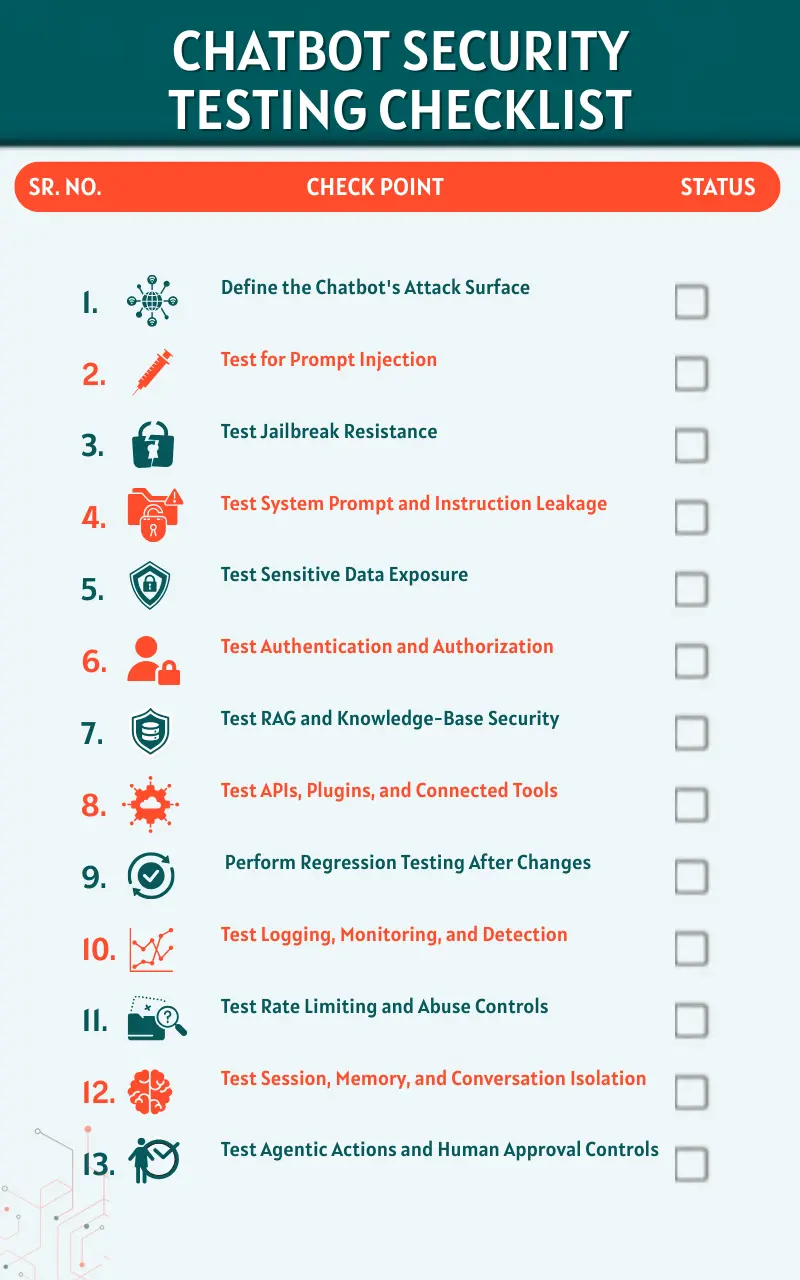
Use this as a quick reference before deploying a customer-facing AI chatbot.
There is no single testing interval that fits every AI chatbot. The appropriate frequency depends on the chatbot's risk, the sensitivity of its data, its integrations, and how frequently its components change. At minimum, security testing should be performed:
For frequently changing AI systems, continuous or regression-based testing is particularly valuable.
The important point is that a chatbot should not be treated as a static application. Its behavior can change when the model, prompts, retrieved information, guardrails, or connected tools change.
Professional AI security testing can be especially valuable when a chatbot:
The value of professional testing is not simply running a larger collection of prompts. A mature assessment should combine AI red teaming, LLM security testing, application and API security testing, authorization testing, manual validation, and business-impact analysis.
This broader approach is important because AI security problems often cross multiple layers. A prompt injection may begin at the chatbot interface but become a serious vulnerability only because the chatbot has access to an over-privileged API or sensitive data source.
A secure AI chatbot is not simply one that gives safe answers. It must also protect customer data, enforce authorization, resist prompt manipulation, secure its APIs and integrations, isolate conversations, constrain tool access, and prevent AI-generated output from becoming a security risk.
That is why effective chatbot security testing needs to look beyond the model itself. The assessment should cover the complete AI application, including its prompts, data sources, RAG pipeline, authentication controls, APIs, tools, guardrails, sessions, and monitoring.
For organizations moving customer-facing AI from experimentation into production, combining AI red teaming with application and API security testing provides a stronger way to identify vulnerabilities and validate the controls that protect customers and business systems.
Start by mapping the chatbot architecture and identifying its data access, integrations, tools, and security boundaries. Then test adversarial inputs, prompt injection, jailbreaks, data exposure, authentication, authorization, RAG security, guardrails, output handling, abuse controls, and agentic actions. Finally, remediate vulnerabilities and retest the affected scenarios.
A comprehensive assessment should include prompt injection, jailbreaks, system prompt leakage, sensitive information disclosure, authentication, authorization, RAG security, API and tool access, LLM guardrails, output handling, rate limiting, session isolation, monitoring, and agentic action controls.
Traditional penetration testing remains necessary, but it does not fully address AI-specific risks by itself. A chatbot assessment should extend application and API testing with AI-focused tests for prompt injection, jailbreaks, system prompt leakage, RAG, model output, guardrails, and tool use.
Major risks include prompt injection, sensitive information disclosure, authorization failures, insecure integrations, excessive tool permissions, guardrail bypasses, RAG weaknesses, and unsafe model output. The impact becomes greater when a chatbot can access sensitive data or perform actions.
Agentic AI risk increases when a chatbot can use tools, access data, make decisions, or perform actions on behalf of users. A manipulated instruction can potentially cause the system to perform an unauthorized operation. Strong permissions, backend authorization, action limits, and human approval can help reduce this risk.