September 24, 2026
The Reflected XSS Methodology: 11 Labs Behind $5,000+ in Bounties and 80+ Pentests
The Reflected XSS Methodology: 11 Labs Behind $5,000+ in Bounties and 80+ Pentests

Salman Khan


Fiza Nadeem is an SEO content writer at ioSENTRIX with 2.5+ years of experience in content writing, copywriting, and SEO.
A cloud security assessment is a structured review of an AWS, Azure or Google Cloud environment that finds misconfigurations, excessive permissions, exposed data and logging gaps before an attacker does, and rates the risk each one carries. It is also called a cloud security risk assessment or, in shorter form, a cloud risk assessment. Whatever the name, the output is the same: a prioritized picture of where your cloud is weak and what to fix first.
This guide walks through the five-step cloud security assessment methodology ioSENTRIX uses, what the assessment covers, the risks it most often finds, the tools involved, and a checklist you can run against your own environment. If you are trying to decide between an assessment and a penetration test, the FAQ at the end draws the line.
A cloud security assessment is a systematic evaluation of the configuration, identity and access controls, network exposure, data protection and logging of a cloud environment against a defined standard, producing a risk-rated list of gaps and the actions needed to close them. It examines the parts of the cloud the customer is responsible for under the shared responsibility model, not the provider's underlying infrastructure.
It can be performed by an internal team or an external firm, once or on a recurring schedule. The reference points are usually the provider's own hardening guidance, the CIS Benchmarks for AWS, Azure and Google Cloud, and control frameworks such as ISO/IEC 27001, ISO/IEC 27017 for cloud-specific controls and NIST SP 800-53. For the risk-rating side, NIST SP 800-30 remains the standard guide for conducting risk assessments. Aligning with these frameworks helps an assessment support a compliance program; it does not by itself make an environment certified or compliant.
A good assessment does more than list gaps. It gives engineers remediation steps they can act on and creates a baseline so the next assessment measures progress. If you are new to how responsibility is split, start with our explainer on the shared responsibility model in the cloud.
A cloud security assessment covers three layers: the cloud infrastructure (identity, network, storage, compute and logging), the applications deployed on it, and the governance and compliance controls around both. Most engagements weight the infrastructure layer heaviest, because that is where most cloud breaches begin.
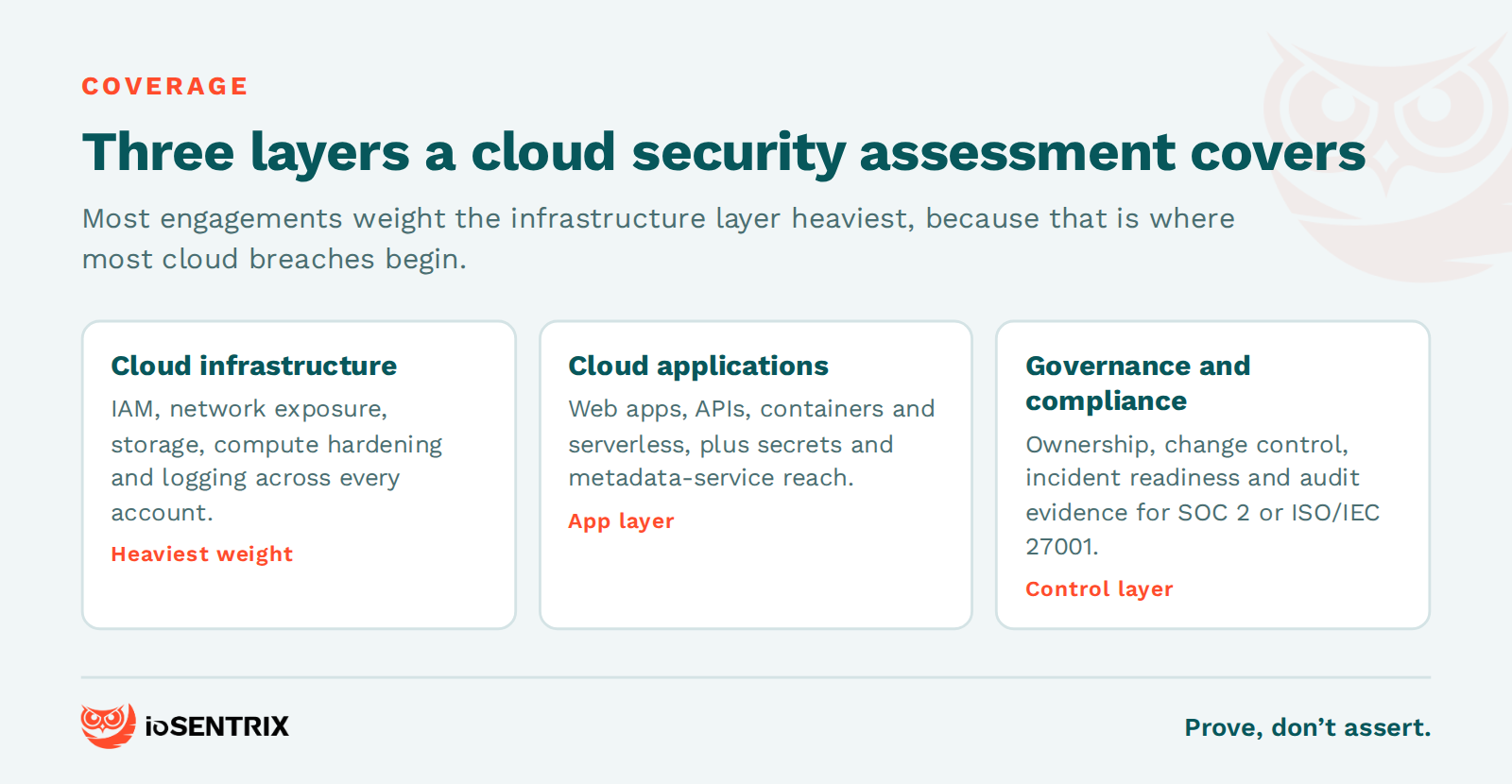
A cloud infrastructure security assessment reviews identity and access management, network configuration, storage exposure, compute hardening and logging across every account, subscription and project in scope. On the identity side that means privileged users without MFA, over-broad roles, stale credentials, cross-account trust and machine identities with more permission than they use. On the network side it means public security groups, exposed management ports and flat networks with no segmentation. Storage review looks for public buckets, unencrypted volumes and snapshots shared too widely. Logging review checks that audit trails are on, centralized, retained and actually monitored. Our post on non-human identity explains why the machine-identity part of this layer is growing fastest.
A cloud application security assessment reviews the web applications, APIs, containers and serverless functions running in the cloud, along with the managed services they depend on for authentication, secrets and data. It checks how applications handle identity, whether secrets sit in code or environment variables, whether container images and functions run with least privilege, and whether an application flaw could be used to reach cloud credentials through the instance metadata service.
The governance layer covers policies, ownership, change control, incident response readiness and mapping to the frameworks the organization must meet. It answers who owns each account, how changes are reviewed before deployment, whether backups are tested and whether the evidence a SOC 2 or ISO/IEC 27001 auditor will ask for actually exists.
A cloud security risk assessment most often finds misconfigurations, weak access control, gaps in logging and incident readiness, and insufficient data and network protection. The Cloud Security Alliance ranks misconfiguration and inadequate change control as the number one threat in its Top Threats to Cloud Computing 2024 report, and unlike most attacks, a misconfiguration requires no exploit at all, only discovery.
Access control problems come next. Overly permissive roles let a compromised account or leaked key change or delete critical resources, and missing MFA on privileged accounts turns a password leak into full account takeover. Logging gaps rarely cause a breach, but they turn a small incident into a long one because nobody can see what happened. Data and network gaps, from unencrypted storage to missing segmentation, decide how far an attacker gets once inside. Our glossary entry on cloud misconfiguration lists the most common patterns.
The examples below are composites drawn from many engagements, not any one client. A storage bucket holding customer exports was readable by any authenticated user of the cloud provider, not just the company's own accounts, because a policy used the wrong principal. A CI/CD service role had administrator rights across three production accounts, so one leaked pipeline token would have meant full compromise. Audit logging was on in the primary region and off in two others where workloads had quietly been deployed. A serverless function accepted an unvalidated URL and could be made to fetch the instance metadata endpoint, handing over a role credential. None of these were exotic. All were findable in an afternoon by someone who knew where to look.
You conduct a cloud security assessment in five steps: scope the environment, inventory and map it, test for vulnerabilities and misconfigurations, report risk-rated findings with fixes, and retest after remediation. The steps are the same for AWS, Azure and Google Cloud; only the services and tooling change.
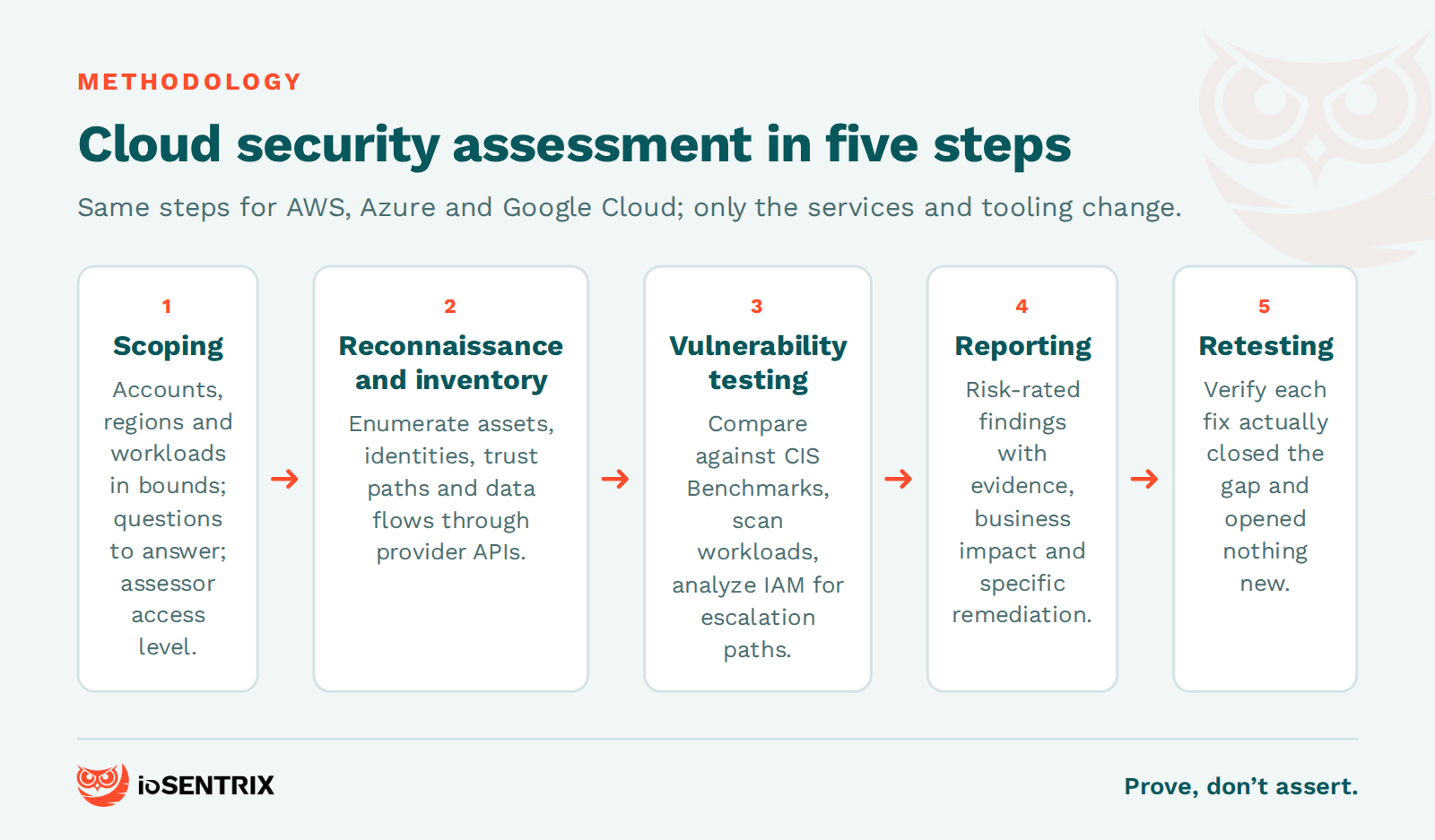
Scoping defines which accounts, subscriptions, projects, regions and workloads are in the assessment, what it is trying to answer, and who needs to be involved. It also settles the access the assessors get: read-only audit roles for a configuration review, or test credentials at defined privilege levels if the engagement includes hands-on testing. If your organization has never run a formal risk assessment, our guide to cybersecurity risk assessment steps covers the groundwork.
Reconnaissance documents every asset, service and data flow inside the scope: the architecture, the identities and their trust relationships, the network paths in and out, and where sensitive data lives. Cloud environments sprawl, so this step relies on provider APIs and enumeration tools rather than a spreadsheet someone maintained last year. The goal is to see the environment the way an attacker would, including the forgotten test account and the region nobody remembers deploying to.
Vulnerability testing compares the inventory against benchmarks and looks for exploitable weaknesses. Configuration is checked against the CIS Benchmarks and provider guidance. Hosts, containers and applications are scanned for known vulnerabilities and exposed services. Identity policies are analyzed for privilege escalation paths. Where the engagement includes it, the assessors validate the most serious findings by hand rather than trusting scanner output. For a fully attacker-driven test of the same environment, where findings are exploited and chained into attack paths, see our guide to cloud penetration testing.
The report condenses everything found into a risk-rated list with evidence, business impact and specific remediation for each item, plus a summary an executive can read in five minutes. It should map findings to the frameworks that matter to you and separate the two-hour fixes from the two-quarter projects. A report that only lists scanner output has not assessed anything.
Retesting happens after fixes are applied. The assessors verify that each finding is actually closed, not just marked closed in a ticket, and check that the fix did not open something new. This is the step most often skipped, and the one that turns a report into a result. Our comparison of vulnerability assessment vs penetration testing explains why verification matters in both.
Cloud security assessment tools fall into four groups: open-source configuration auditors, cloud security posture management (CSPM) platforms, provider-native security services, and conventional vulnerability and application scanners. None replaces an assessor's judgment; they make the inventory and benchmark steps fast so judgment can go where it is needed.
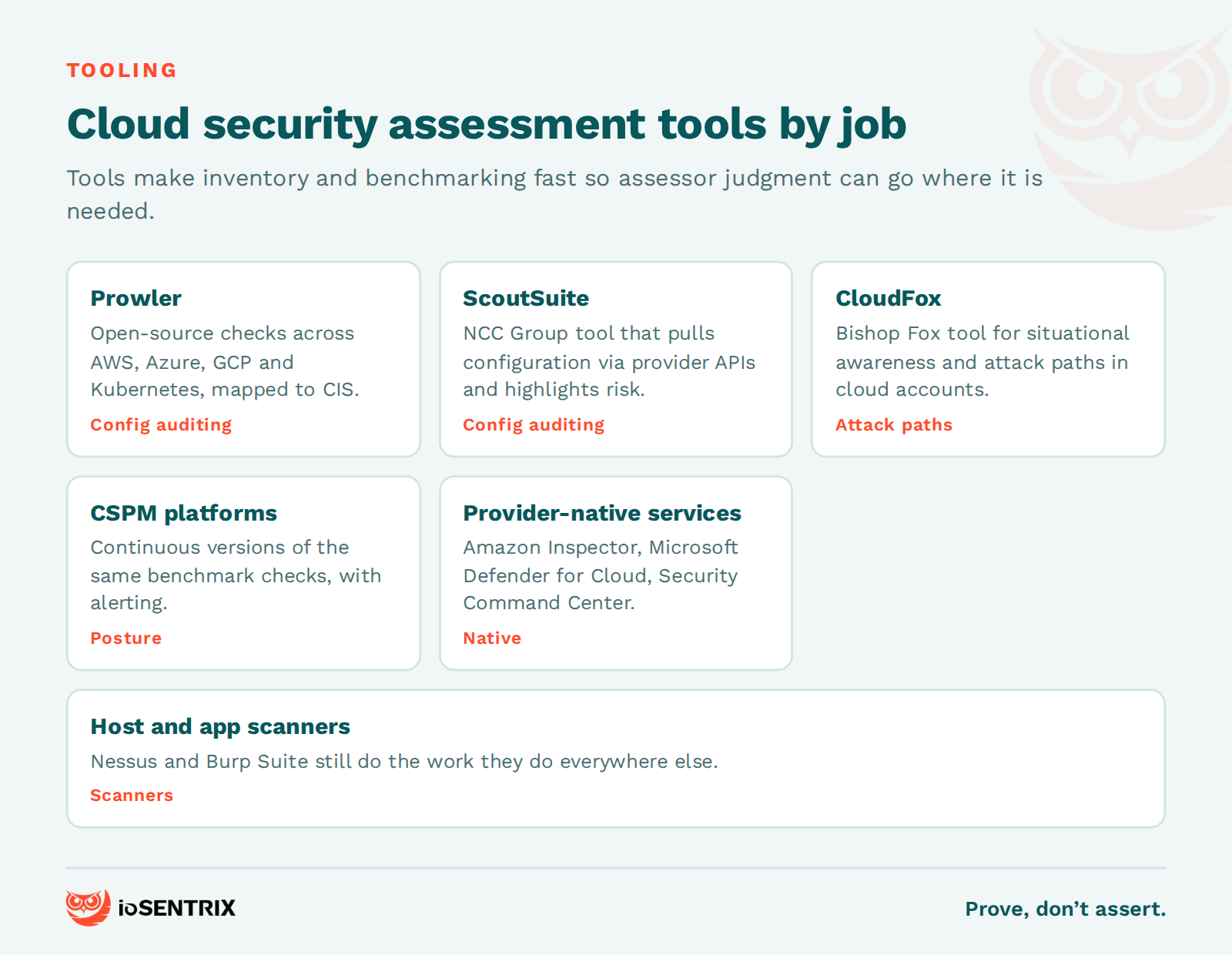
Prowler runs security and compliance checks across AWS, Azure, GCP and Kubernetes and maps them to frameworks such as CIS. ScoutSuite, maintained by NCC Group, pulls configuration through provider APIs and highlights risk across AWS, Azure and Google Cloud. CloudFox, from Bishop Fox, helps assessors gain situational awareness and spot attack paths in unfamiliar environments. CSPM platforms do continuous versions of the same checks; our glossary entry on CSPM explains where they fit.
On the provider side, Amazon Inspector scans EC2 instances, container images and Lambda functions for vulnerabilities and unintended network exposure; Microsoft Defender for Cloud includes posture management for Azure and multicloud resources; and Google Cloud's Security Command Center provides posture management and threat detection for Google Cloud projects. For hosts and applications, scanners such as Tenable's Nessus and PortSwigger's Burp Suite still do the work they do everywhere else.
A cloud security risk assessment checklist covers the controls that decide whether a misconfiguration becomes a breach. Use it to prepare for an assessment or to run a lightweight one yourself.
A cloud security assessment reviews configuration, identity, network, data and logging controls against a standard and reports risk-rated gaps. Cloud penetration testing attempts to exploit those gaps to prove what an attacker could actually do, chaining findings into attack paths. The assessment is broader and faster; the penetration test is deeper and adversarial. Most organizations run the assessment first and use it to focus the test.
A cloud risk assessment is the same exercise as a cloud security risk assessment: identifying the threats and weaknesses in a cloud environment, estimating the likelihood and impact of each, and prioritizing what to fix. The shorter name is common in governance and audit contexts, where the emphasis is on the risk rating rather than the technical testing.
A cloud infrastructure security assessment is the part of a cloud security assessment that focuses on the platform layer: identity and access management, network configuration, storage exposure, compute hardening and logging. It excludes application code and focuses on how the cloud accounts themselves are built and controlled.
At least once a year, and after any major change: a new account or region, a migration, a significant IAM redesign or a merger. Because cloud environments change daily, many organizations pair an annual full assessment with continuous posture monitoring through a CSPM tool and targeted reassessments after significant deployments.
A cloud security risk assessment questionnaire is a structured set of questions, usually sent to a cloud service provider or vendor, that asks how they secure their service: certifications, encryption, access control, logging, incident response and data location. It is a due-diligence tool for third-party risk, and it complements rather than replaces a technical assessment of your own environment.
ioSENTRIX is a CREST-accredited penetration testing firm, ISO/IEC 27001 certified and SOC 2 Type 2 attested. Our cloud security services cover configuration reviews, cloud security assessments and cloud penetration testing for AWS, Azure and Google Cloud, delivered by people who spend their days finding the gaps benchmarks miss. We do not stop at reporting that a control exists. We test whether it holds, give you evidence either way, and retest after you fix it.
If you want to know where your cloud is weak before someone else finds out, talk to us about scoping a cloud security assessment.